
Secure Embed Parameters
Customize Bold BI dashboards and widgets in iFrame embeds using optional URL parameters. Configure parameters via the Bold BI UI in the “Get Embed Code” dialog or manually append them as query strings. Some parameters require manual addition. Refer to the parameter tables for names, descriptions, types, and applicability.
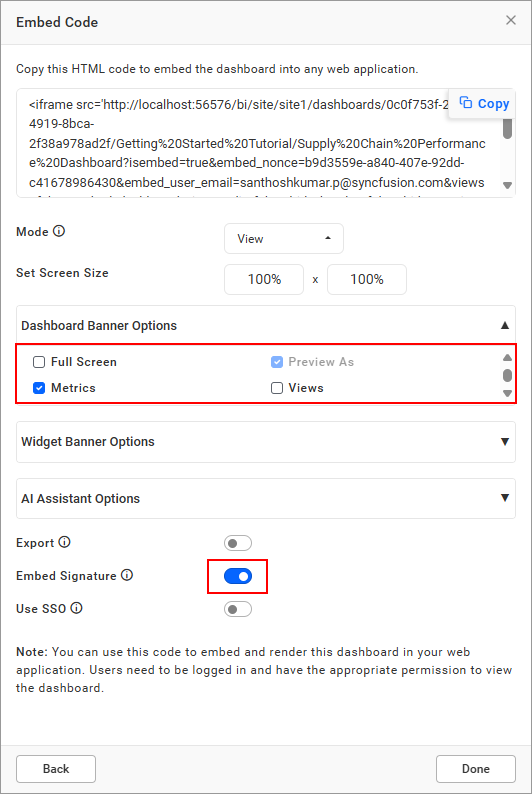
Parameters Configurable in Bold BI UI
These parameters can be set directly in the Bold BI UI using the “Get Embed Code” dialog box.
| Parameter | Description | Example |
|---|---|---|
views |
Show/hide views icon in toolbar (default: false). Replaces embed_dashboard_views (supported until v11.3). |
true |
embed_dashboard_views_edit |
Enable/disable Save and Save As in filter overview (default: false). | true |
export |
Show/hide export option for dashboards/widgets (default: false). Replaces embed_dashboard_export (supported until v11.3). |
true |
dashboard_comments |
Show/hide dashboard comments icon (default: false). Supports post, edit, delete, reply, watch, un-watch, image posting, and user mentions. Replaces embed_dashboard_comments (supported until v11.3). |
true |
widget_comments |
Show/hide widget comments icon (default: false). Supports post, edit, delete, reply, watch, un-watch, image posting, and user mentions. Replaces embed_widget_comments (supported until v11.3). |
true |
hide_dashboard_edit |
Show/hide dashboard edit icon (shown only if user has edit permission; default: false). | false |
hide_preview_as |
Show/hide preview as option in dashboard designer (default: false). | false |
enable_ai_assistant |
Show/hide AI Assistant icon (default: false). | true |
enable_ai_summary |
Show AI summary icons for dashboards (ds) or widgets (ws). Requires enable_ai_assistant=true. |
ds,ws |
hide_aidata_usage |
Show/hide AI Data Usage icon in AI Assistant window (default: false). Requires enable_ai_assistant=true. |
false |
embed_dashboard_favorite |
Show/hide dashboard favorite icon in toolbar (default: true). | true |
hide_header |
Show/hide dashboard header (default: false). | false |
hide_metrics |
Show/hide metrics in dashboard banner (default: false). | false |
hide_tool |
Hide toolbar icons. Values: dp (Dashboard Parameter), fo (Filter Overview), fs (FullScreen), rf (Refresh), om (Option Menu), sh (Schedule). |
dp,fo,fs,rf,om,sh |
hide_widget_tool |
Hide widget options. Values: fr (Filter), fs (FullScreen), om (Option Menu). |
fr,fs |
Parameters Requiring Manual Addition to iFrame URL
These parameters must be manually added to the iFrame URL as they are not configurable through the Bold BI UI.
| Parameter | Description | Example |
|---|---|---|
embed_timestamp |
UNIX timestamp to verify URL creation within the last 6 days. | 1583934776 |
embed_expirationtime |
Sets token expiration in seconds (86400 to 518400). Requires embed_timestamp. |
518400 |
embed_theme |
Apply a custom theme to all widgets. | custom |
customize_ai_name |
Customize AI Copilot title. Requires enable_ai_assistant=true. |
custom name |
embed_datasource_filter |
Filter dashboard with dashboard parameters (prefixed &&) or URL parameters (prefixed &). |
&&DashboardParameter1=Value1&URLParameter2=Value2 |
restrict_mobile_view |
Prevent mobile view when resizing browser (default: false). | true |
hide_language_dropdown |
Show/hide localization dropdown in dashboard banner (default: false). Requires Localize Dashboard configuration. | true |
language_code |
Set dashboard language (e.g., fr-FR for French, ar-AE for Arabic). Requires Localize Dashboard configuration. |
fr-FR |
URL Creation
Follow these steps to manually create a secure embed URL with a signature for advanced use cases.
Step 1: Create the Embed URL
The embed URL follows this format:
{base URL}/{embed parameters}&embed_signature={signature}- Base URL: The URL for the dashboard, widget, or data source, hosted on your server (e.g.,
http://localhost:51777).
| Type | URL |
|---|---|
| View Dashboard | http://localhost:51777/bi/site/site1/dashboards/8428c9d9-85db-418c-b877-ea4495dcddd7/Predictive%20Analytics/Personal%20Expense%20Analysis |
| Edit Dashboard | http://localhost:51777/bi/site/site1/dashboard-designer/8428c9d9-85db-418c-b877-ea4495dcddd7/Predictive%20Analytics/Personal%20Expense%20Analysis |
| Create Dashboard | http://localhost:51777/bi/site/site1/dashboard-designer |
| Widget | Add ?isWidgetMode=true&widgetId={widgetId} to the dashboard URL |
| Data Source (Create) | http://localhost:51777/bi/site/site1/datasource-designer/connection |
| Data Source (Edit) | http://localhost:51777/bi/site/site1/datasource-designer/8428c9d9-85db-418c-b877-ea4495dcddd7/Personal%20Expense%20Analysis |
- Embed Parameters (Mandatory):
| Parameter | Description |
|---|---|
| embed_nonce | A random GUID to prevent URL tampering (e.g., 3e253410-1a82-4fb3-a337-122a8007dafc). |
| embed_user_email | The user’s email (e.g., admin@domain.com). |
- Embed Signature: A hashed value generated using the HMACSHA256 algorithm with the embed parameters and your
embed secret key. Refer to the Bold BI site administration settings for the key.
Step 2: Generate the Embed Signature
To add or modify parameters not available in the Bold BI UI, generate a new embed signature using this C# code (or equivalent):
var embedParameters = "embed_nonce=55a1c8f4-5015-487d-8463-d3ebeae655fd&embed_user_email=admin@domain.com";
var embedSecretKey = "7tFaq2zidmxJN8Pid6IUAiGFqAUwMfK";

public string GetSignatureUrl(string embedParameters, string embedSecretKey)
{
    var encoding = new System.Text.UTF8Encoding();
    var keyBytes = encoding.GetBytes(embedSecretKey);
    var messageBytes = encoding.GetBytes(embedParameters);
    using (var hmacsha = new HMACSHA256(keyBytes))
    {
        var embedSignature = hmacsha.ComputeHash(messageBytes);
        return Convert.ToBase64String(embedSignature);
        // Example output: VYrDMVX4h85PrRBKX9mystRHYkU8z+HVC9bkVMc2qGY=
    }
}
Step 3: Combine and Embed
Combine the base URL, embed parameters, and signature. Example for a dashboard:
<iframe src="http://localhost:51777/bi/site/site1/dashboards/8428c9d9-85db-418c-b877-ea4495dcddd7/Predictive%20Analytics/Personal%20Expense%20Analysis?embed_nonce=3e253410-1a82-4fb3-a337-122a8007dafc&embed_user_email=admin@domain.com&embed_signature=VYrDMVX4h85PrRBKX9mystRHYkU8z+HVC9bkVMc2qGY=" width="100%" height="100%"></iframe>Example: Generating URL with embed_datasource_filter for Row-Level Security
To implement row-level security, append the embed_datasource_filter parameter to filter data by user-specific criteria.
Steps to Generate the URL:
- Start with the Base URL: Use the dashboard URL.
- Add Mandatory Parameters: Include
embed_nonceandembed_user_email. - Add embed_datasource_filter: Append the filter, e.g.,
&embed_datasource_filter=&&Region=North&Department=Sales. - Generate Embed Signature: Generate a new signature for the parameters (including
embed_datasource_filter) using the embed secret key, as described in the Embed Using Embed Secret Token documentation. - Combine and Embed: Combine the base URL, parameters, and signature, then embed in an iFrame:
<iframe src="http://localhost:51777/bi/en-us/site/site1/dashboards/8428c9d9-85db-418c-b877-ea4495dcddd7/Predictive%20Analytics/Sales%20Dashboard?embed_nonce=3e253410-1a82-4fb3-a337-122a8007dafc&embed_user_email=admin@domain.com&embed_datasource_filter=&&Region=North&Department=Sales&embed_signature=VYrDMVX4h85PrRBKX9mystRHYkU8z+HVC9bkVMc2qGY=" width="100%" height="100%"></iframe>For more details, refer to the Apply Row-Level Filters via URL documentation.
Notes
- Signature Regeneration: The copied URL includes a signature valid only for parameters configured in the Bold BI UI. Adding or removing parameters after copying invalidates the signature, breaking the URL.
- Dependencies: Parameters like
enable_ai_summary,hide_aidata_usage, andcustomize_ai_namerequireenable_ai_assistant=true.embed_expirationtimerequiresembed_timestamp. Refer to the Configure AI documentation. - Localization: Parameters
hide_language_dropdownandlanguage_coderequire prior configuration in Bold BI. See the Localization documentation. - Custom Theme: The
embed_themeparameter requires uploading custom theme files to the Bold BI server. See the Custom Theme documentation. - Legacy Support: Parameters like
views,export,dashboard_comments, andwidget_commentsreplace older names (e.g.,embed_dashboard_views), supported until Bold BI v11.3.