
Customize using URL Parameters
Customize Bold BI dashboards and widgets in web apps by adding URL parameters to the iFrame embed URL. Configure parameters via the Bold BI UI in the “Get Embed Code” dialog or manually append them to the URL. Some parameters require manual addition. Refer to the parameter tables for names, types, applicability, descriptions, and examples, added as query strings.
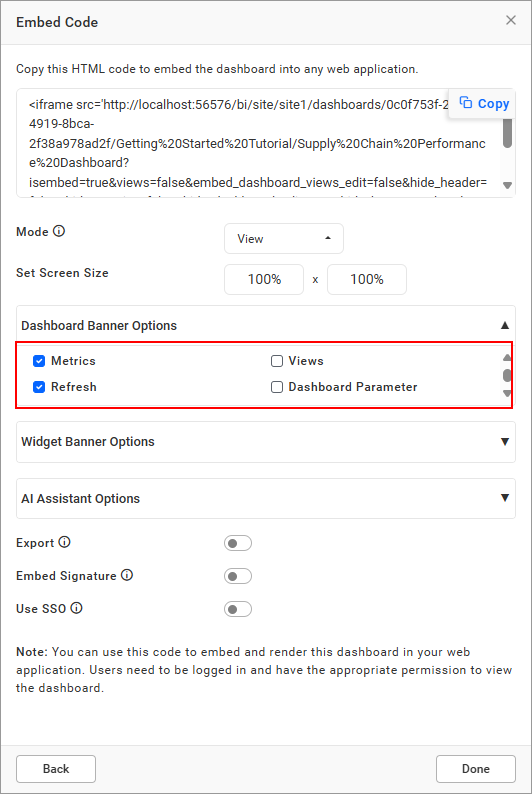
Parameters Configurable in Bold BI UI
The following parameters can be configured directly within the Bold BI user interface using checkboxes or dropdowns.
| Parameter | Type | In Dashboards | In Widgets |
|---|---|---|---|
dashboard_comments |
boolean |
Show or hide the comments icon for dashboards (default: false). | N/A |
widget_comments |
boolean |
N/A | Show or hide the comments icon for widgets (default: false). |
embed_dashboard_views_edit |
boolean |
Enable or disable Save and Save As options in the filter overview (default: false). | N/A |
views |
boolean |
Show or hide the views icon for dashboards (default: false). | N/A |
export |
boolean |
Show or hide the export option for dashboards (default: false). | Show or hide the export option for widgets (default: false). |
hide_header |
boolean |
Show or hide the dashboard header (default: false). | N/A |
hide_metrics |
boolean |
Show or hide metrics in the dashboard banner (default: false). | N/A |
hide_preview_as |
boolean |
Show or hide the preview as option in the dashboard designer (default: false). | N/A |
hide_dashboard_edit |
boolean |
Show or hide the edit icon (shows only if user has edit permission; default: true). | N/A |
hide_tool |
string |
Hide toolbar options. Values: dp (Dashboard Parameter), fo (Filter Overview), fs (FullScreen), rf (Refresh), om (Option Menu), sh (Schedule).Example: &hide_tool=fo,fs,dp |
N/A |
hide_widget_tool |
string |
N/A | Hide widget options. Values: fr (Filter), fs (FullScreen), om (Option Menu).Example: &hide_widget_tool=fr,fs |
enable_ai_assistant |
boolean |
Show or hide the AI Assistant icon (default: false). | N/A |
enable_ai_summary |
string |
Show AI Dashboard Summary icon. Value: ds (Dashboard Summary).Example: &enable_ai_summary=dsNote: Requires enable_ai_assistant=true. |
Show AI Widget Summary icon. Value: ws (Widget Summary).Example: &enable_ai_summary=wsNote: Requires enable_ai_assistant=true. |
hide_aidata_usage |
boolean |
Show or hide AI Data Usage icon in AI Assistant window (default: false). Note: Requires enable_ai_assistant=true. |
N/A |
hassso |
boolean |
Enable or disable SSO authentication (default: false). | Enable or disable SSO authentication (default: false). |
externallogin |
string |
Specify SSO provider. Values: windowsad, azuread, oauth, openid.Example: &externallogin=azuread |
Specify SSO provider. Values: windowsad, azuread, oauth, openid.Example: &externallogin=azuread |
Parameters Requiring Manual Addition to iFrame URL
The following parameters must be manually added to the iFrame URL as they are not configurable through the Bold BI UI.
| Parameter | Type | In Dashboards | In Widgets |
|---|---|---|---|
embed_theme |
string |
Apply a custom theme to the dashboard. Example: &embed_theme=custom |
Apply a custom theme to all widgets. Example: &embed_theme=custom |
embed_datasource_filter |
object |
Filter dashboard with parameters. Dashboard parameters start with &&, URL parameters with &.Example: &embed_datasource_filter=&&dashboardparametername=value&urlparametername=value |
Filter widget with parameters. Dashboard parameters start with &&, URL parameters with &.Example: &embed_datasource_filter=&&dashboardparametername=value&urlparametername=value |
restrict_mobile_view |
boolean |
Prevent mobile view when resizing browser (default: false). | N/A |
hide_language_dropdown |
boolean |
Show or hide localization dropdown in dashboard banner (default: false). Note: Requires Localize Dashboard configuration in Bold BI. |
N/A |
language_code |
string |
Set dashboard language (e.g., fr-FR for French, ar-AE for Arabic).Example: &language_code=fr-FRNote: Requires Localize Dashboard configuration in Bold BI. |
N/A |
customize_ai_name |
string |
Customize AI Copilot title. Example: &customize_ai_name=MyAINote: Requires enable_ai_assistant=true. |
N/A |
Notes
- Parameters like
enable_ai_summary,hide_aidata_usage, andcustomize_ai_namerequireenable_ai_assistant=true. For AI configuration, refer to the Configure AI documentation. - Localization parameters (
hide_language_dropdown,language_code) require prior configuration in Bold BI. See the Localization documentation for details. - Custom Theme Parameter like embed_theme parameter requires uploading custom theme files to the Bold BI server. See the Custom Theme documentation for configuration steps.