
Bold BI Dashboards Embedding in ASP.NET MVC Sample with Embedded SDK
A GitHub link has been provided to get the sample application, which demonstrates the rendering of a single dashboard and a list of dashboards in your Bold BI server. This is followed by steps to create a new embedding application in ASP.NET MVC on your own.
NOTE: The best way to get started would be to read the Getting Started section of the documentation first. The
Getting Startedguide provides you with enough information that you need to know before working on the sample.
Prerequisites
How to run the sample
-
Please get the ASP.NET MVC sample from GitHub.
-
Please make sure that you have enabled embed authentication on the
embed settingssettings page. If it is not currently enabled, please refer to the provided image or detailed instructions to enable it.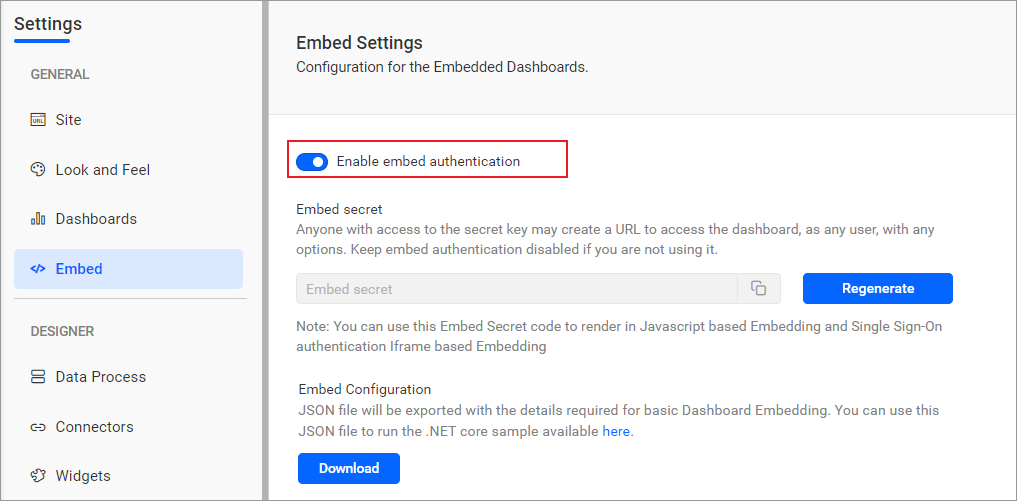
-
To download the
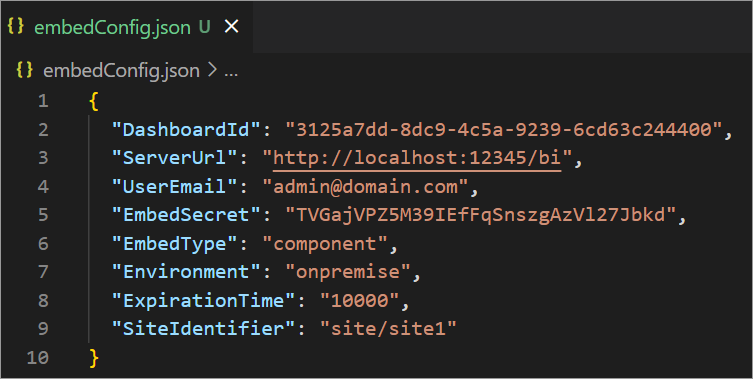
embedConfig.jsonfile, please click on the following link for reference. Additionally, you can refer to the image below for visual guidance.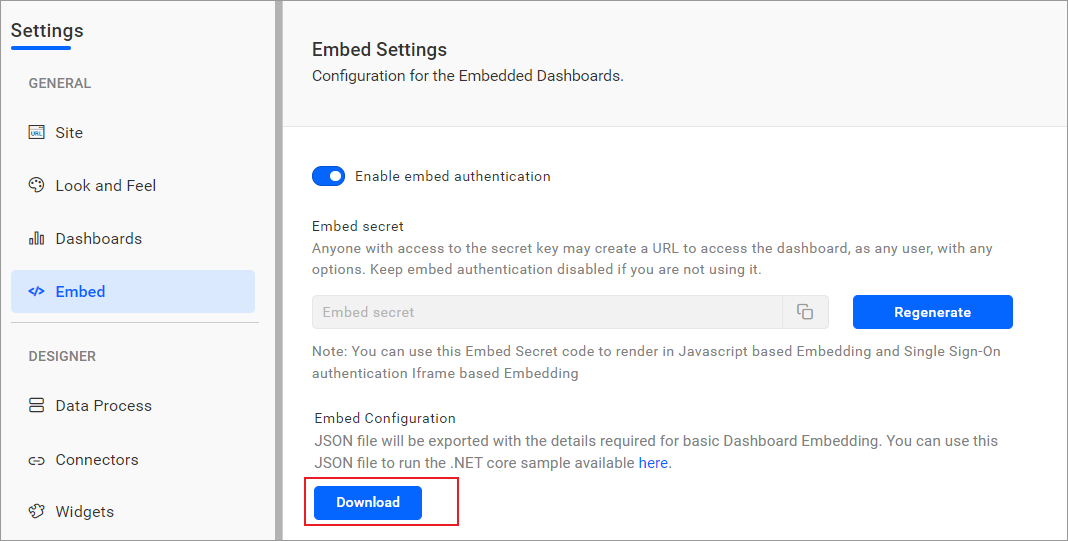
-
Please copy the downloaded
embedConfig.jsonfile and paste it into the designated location within the application. Make sure you have placed it in the application, as shown in the image below.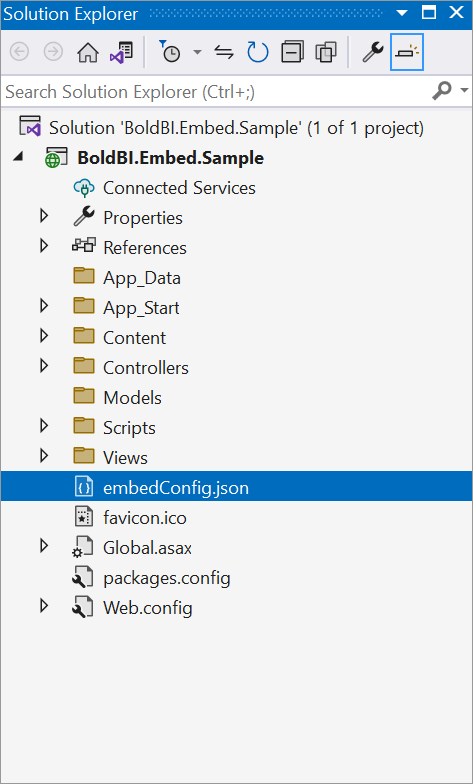
ServerUrl Dashboard Server BI URL (ex: http://localhost:5000/bi, https://demo.boldbi.com/bi) SiteIdentifier For Bold BI Enterprise edition, it should be like site/site1. For Bold BI Cloud, it should be an empty string. UserEmail UserEmail of the Admin in your Bold BI, which would be used to get the dashboards list. EmbedSecret Get your EmbedSecret key from the Embed tab by enabling the Enable embed authenticationin the Administration pageEnvironment Your Bold BI application environment. (If it is cloud analytics server, use `BoldBI.Environment.Cloud`; if it is your own server, use `BoldBI.Environment.Enterprise`) DashboardId Item id of the dashboard to be embedded in your application. ExpirationTime Token expiration time. (In the EmbedConfig.json file, the default token expiration time is 10000 seconds) -
Please run your
ASP.NET MVCsample in Visual Studio.
NOTE: If you encounter an error with
bin\roslyn\csc.ex, it means that you need to perform a cleanclean buildandrebuild.
NOTE: By default, we display the dashboard embedding without the dashboard listing sidebar. To access the dashboard list, you need to navigate to the
dashboardlistingURL (e.g.,http://localhost:44382/home/dashboardlisting).
How this sample works
Single Dashboard Embedding
-
In
HomeController.cs, theIndex()method reads values fromembedConfig.jsonand stores them in the server-side model. These values are then assigned to JavaScript variables inIndex.cshtmlfor front-end use. ThetokenGenerationUrlis configured to call theTokenGenerationaction for authentication.public ActionResult Index() { string basePath = AppDomain.CurrentDomain.BaseDirectory; string jsonString = System.IO.File.ReadAllText(Path.Combine(basePath, "embedConfig.json")); GlobalAppSettings.EmbedDetails = JsonConvert.DeserializeObject<EmbedDetails>(jsonString); return View(); }<html> <head> <link rel="stylesheet" href="https://fonts.googleapis.com/css?family=Roboto:400,700" /> <link rel="stylesheet" href="~/Content/Site.css" /> <script type="text/javascript" src="https://cdn.boldbi.com/embedded-sdk/latest/boldbi-embed.js"></script> <script type="text/javascript" src="~/Scripts/Embed/Index.js"></script> <script type="text/javascript"> var rootUrl = "@GlobalAppSettings.EmbedDetails.ServerUrl"; var dashboardId = "@GlobalAppSettings.EmbedDetails.DashboardId"; var siteIdentifier = "@GlobalAppSettings.EmbedDetails.SiteIdentifier"; var environment = "@GlobalAppSettings.EmbedDetails.Environment"; var embedType = "@GlobalAppSettings.EmbedDetails.EmbedType"; var tokenGenerationUrl = "@Url.Action("TokenGeneration", "Home")"; </script> </head> <body onload="renderDashboard(dashboardId)"> <div id="viewer-section" style="width: 100%";> <div id="dashboard"></div> </div> </body> </html> -
To generate an access token, call the
TokenGenerationAPI with the providedembedConfigvalues.[HttpPost] [Route("TokenGeneration")] public string TokenGeneration() { var embedDetails = new { email = GlobalAppSettings.EmbedDetails.UserEmail, serverurl = GlobalAppSettings.EmbedDetails.ServerUrl, siteidentifier = GlobalAppSettings.EmbedDetails.SiteIdentifier, embedsecret = GlobalAppSettings.EmbedDetails.EmbedSecret, dashboard = new // Dashboard ID property is mandatory only when using BoldBI version 14.1.11. { id = GlobalAppSettings.EmbedDetails.DashboardId } }; //Post call to Bold BI server var client = new HttpClient(); var requestUrl = $"{embedDetails.serverurl}/api/{embedDetails.siteidentifier}/embed/authorize"; var jsonPayload = JsonConvert.SerializeObject(embedDetails); var httpContent = new StringContent(jsonPayload, Encoding.UTF8, "application/json"); var result = client.PostAsync(requestUrl, httpContent).Result; var resultContent = result.Content.ReadAsStringAsync().Result; return JsonConvert.DeserializeObject<dynamic>(resultContent).Data.access_token; } -
Once the token is generated, it will be returned to the
index.jsfile and the dashboard will start to render it.function getEmbedToken() { return fetch(tokenGenerationUrl, { method: 'POST', headers: { 'Content-Type': 'application/json' }, body: JSON.stringify({}) }) .then(response => { if (!response.ok) throw new Error("Token fetch failed"); return response.text(); }); } function renderDashboard(dashboardId) { getEmbedToken() .then(accessToken => { const dashboard = BoldBI.create({ serverUrl: rootUrl + "/" + siteIdentifier, dashboardId: dashboardId, embedContainerId: "dashboard", embedToken: accessToken }); dashboard.loadDashboard(); }) .catch(err => { console.error("Error rendering dashboard:", err); }); };
Dashboard Listing
-
The
DashboardListingaction inHomeController.csretrieves the necessary properties fromembedConfig, deserializes them intoGlobalAppSettings.EmbedDetails, and passes them to the view.[HttpGet] [Route("DashboardListing")] public ActionResult DashboardListing() { string basePath = AppDomain.CurrentDomain.BaseDirectory; string jsonString = System.IO.File.ReadAllText(Path.Combine(basePath, "embedConfig.json")); GlobalAppSettings.EmbedDetails = JsonConvert.DeserializeObject<EmbedDetails>(jsonString); return View(); }<!DOCTYPE html> <html> <head> <link rel="stylesheet" href="~/Content/Site.css" /> <script type="text/javascript" src="https://cdn.boldbi.com/embedded-sdk/latest/boldbi-embed.js"></script> <script type="text/javascript" src="~/Scripts/Embed/Index.js"></script> <script type="text/javascript"> var rootUrl = "@GlobalAppSettings.EmbedDetails.ServerUrl"; var dashboardId = "@GlobalAppSettings.EmbedDetails.DashboardId"; var siteIdentifier = "@GlobalAppSettings.EmbedDetails.SiteIdentifier"; var environment = "@GlobalAppSettings.EmbedDetails.Environment"; var embedType = "@GlobalAppSettings.EmbedDetails.EmbedType"; var getDashboardsUrl = "@Url.Action("GetDashboards", "Home")"; var tokenGenerationUrl = "@Url.Action("TokenGeneration", "Home")"; </script> </head> <body onload="Init()"> <div id="container"> <div class="header-section"> <div id="grid-title">All Dashboards</div> </div> <div id="panel"> </div> </div> <div id="viewer-section"> <div id="dashboard"></div> </div> </body> </html> -
When the page loads, the Init() function triggers an AJAX request to the getDashboardsUrl endpoint, where the GetDashboards() method in
HomeController.csretrieves an authentication token using GetToken() and fetches the list of available dashboards from the Bold BI server.function Init() { var http = new XMLHttpRequest(); http.open("GET", getDashboardsUrl, true); http.responseType = 'json'; http.setRequestHeader("Content-type", "application/json"); http.onreadystatechange = function () { if (http.readyState == 4 && http.status == 200) { ListDashboards.call(this, typeof http.response == "object" ? http.response : JSON.parse(http.response)); } else if (http.readyState == 4 && http.status == 404) { console.log("Server not found"); } else if (http.readyState == 4) { console.log(http.statusText); } }; http.send(); };[HttpGet] [Route("dashboards/get")] public string GetDashboards() { var token = GetToken(); using (var client = new HttpClient()) { client.BaseAddress = new Uri(GlobalAppSettings.EmbedDetails.ServerUrl); client.DefaultRequestHeaders.Accept.Clear(); client.DefaultRequestHeaders.Add("Authorization", token.TokenType + " " + token.AccessToken); var result = client.GetAsync(GlobalAppSettings.EmbedDetails.ServerUrl + "/api/" + GlobalAppSettings.EmbedDetails.SiteIdentifier + "/v2.0/items?ItemType=2").Result; string resultContent = result.Content.ReadAsStringAsync().Result; return resultContent; } } public Token GetToken() { using (var client = new HttpClient()) { System.Net.ServicePointManager.SecurityProtocol = System.Net.SecurityProtocolType.Tls | System.Net.SecurityProtocolType.Tls11 | System.Net.SecurityProtocolType.Tls12; client.BaseAddress = new Uri(GlobalAppSettings.EmbedDetails.ServerUrl); client.DefaultRequestHeaders.Accept.Clear(); var content = new FormUrlEncodedContent(new[] { new KeyValuePair<string, string>("Username", GlobalAppSettings.EmbedDetails.UserEmail), new KeyValuePair<string, string>("grant_type", "embed_secret"), new KeyValuePair<string, string>("embed_secret", GlobalAppSettings.EmbedDetails.EmbedSecret) }); var result = client.PostAsync(GlobalAppSettings.EmbedDetails.ServerUrl + "/api/" + GlobalAppSettings.EmbedDetails.SiteIdentifier + "/token", content).Result; string resultContent = result.Content.ReadAsStringAsync().Result; var response = JsonConvert.DeserializeObject<Token>(resultContent); return response; } } -
Once the dashboards are retrieved, the
ListDashboards()function is called with the fetched data. This function automatically loads the first dashboard from the list by callingrenderDashboard(data[0].Id).function ListDashboards(data) { if (typeof (data) != "undefined" && data != null) { renderDashboard(data[0].Id); data.forEach(function (element) { var divTag = document.createElement("div"); divTag.innerHTML = element.Name; divTag.className = "dashboard-item"; divTag.setAttribute("onclick", "renderDashboard('" + element.Id + "')"); divTag.setAttribute("name", element.Name); divTag.setAttribute("itemid", element.Id); divTag.setAttribute("version", element.Version); divTag.setAttribute("ispublic", element.IsPublic); document.getElementById("panel").appendChild(divTag); }); } } function getEmbedToken() { return fetch(tokenGenerationUrl, { method: 'POST', headers: { 'Content-Type': 'application/json' }, body: JSON.stringify({}) }) .then(response => { if (!response.ok) throw new Error("Token fetch failed"); return response.text(); }); } function renderDashboard(dashboardId) { getEmbedToken() .then(accessToken => { const dashboard = BoldBI.create({ serverUrl: rootUrl + "/" + siteIdentifier, dashboardId: dashboardId, embedContainerId: "dashboard", embedToken: accessToken }); dashboard.loadDashboard(); }) .catch(err => { console.error("Error rendering dashboard:", err); }); }; -
To generate an access token, call the
TokenGenerationAPI with the providedembedConfigvalues.[HttpPost] [Route("TokenGeneration")] public string TokenGeneration() { var embedDetails = new { email = GlobalAppSettings.EmbedDetails.UserEmail, serverurl = GlobalAppSettings.EmbedDetails.ServerUrl, siteidentifier = GlobalAppSettings.EmbedDetails.SiteIdentifier, embedsecret = GlobalAppSettings.EmbedDetails.EmbedSecret, dashboard = new // Dashboard ID property is mandatory only when using BoldBI version 14.1.11. { id = GlobalAppSettings.EmbedDetails.DashboardId } }; //Post call to Bold BI server var client = new HttpClient(); var requestUrl = $"{embedDetails.serverurl}/api/{embedDetails.siteidentifier}/embed/authorize"; var jsonPayload = JsonConvert.SerializeObject(embedDetails); var httpContent = new StringContent(jsonPayload, Encoding.UTF8, "application/json"); var result = client.PostAsync(requestUrl, httpContent).Result; var resultContent = result.Content.ReadAsStringAsync().Result; return JsonConvert.DeserializeObject<dynamic>(resultContent).Data.access_token; } -
Once the token is generated, it will be returned to the
index.jsfile and the dashboard will start to render it.
Steps to create new ASP.NET MVC application to embed dashboard
-
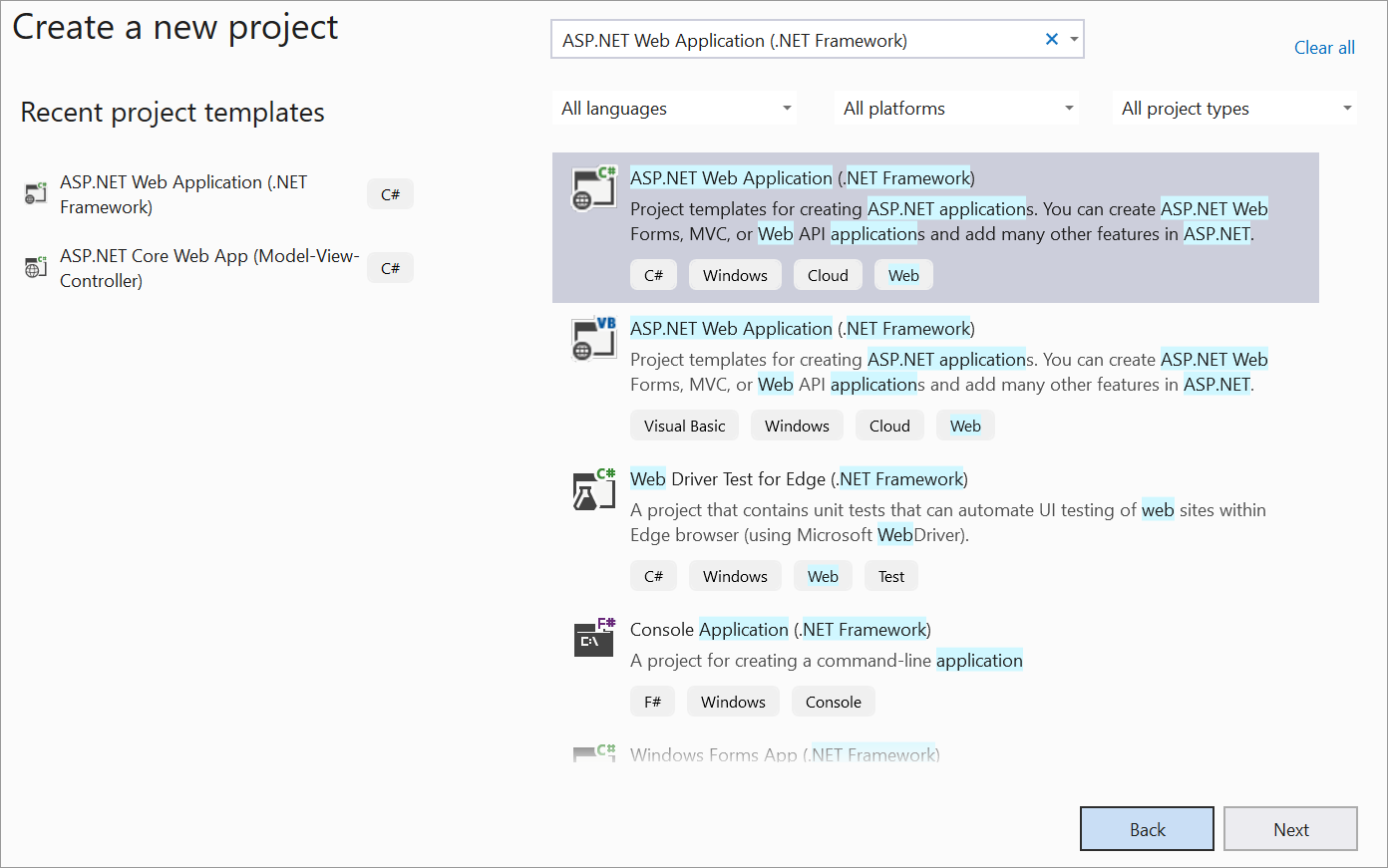
To begin, open Visual Studio and select
Createnew project. -
Next, choose ASP.NET Web Application (.NET Framework) and click Next.
-
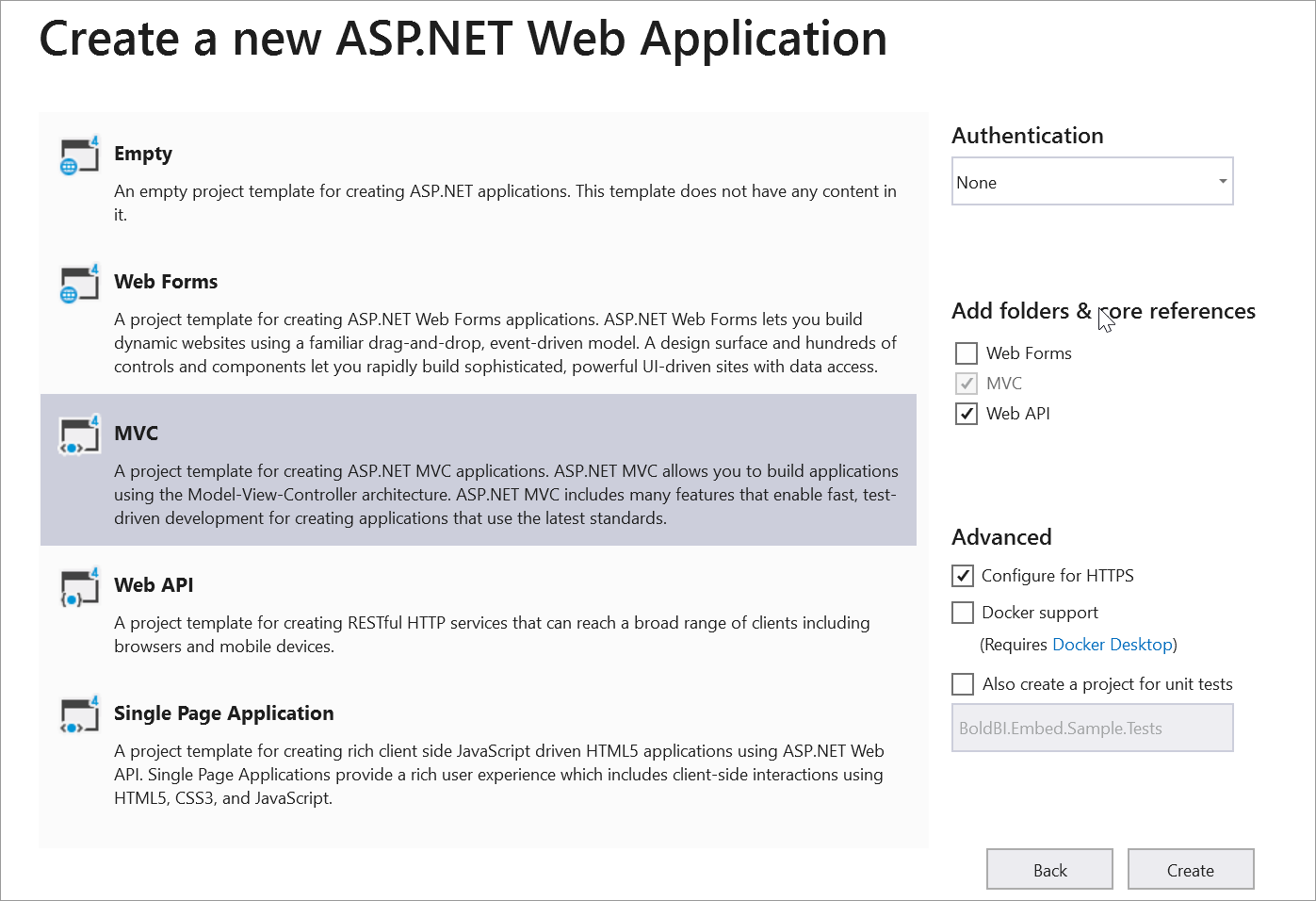
Please feel free to change the project name as desired, and then click on the Create button.
-
Please select MVC and Web API, and then click OK.
-
Please make sure that you have enabled embed authentication on the embed
embed settingspage. If it is not currently enabled, please refer to the following image or detailed instructions to enable it. -
To download the
embedConfig.jsonfile, please click on the following link for reference. Additionally, you can refer to the accompanying image for visual guidance.
-
Please copy the downloaded
embedConfig.jsonfile and paste it into the designated location within the application. Please make sure you have placed it in the application, as shown in the image below. -
Please create another model class named
DataClass.csto define the following properties. These properties will be used to retrieve the dashboard details from the server. Please make sure to include theusing Newtonsoft.Json;namespace in theDataClass.csmodel file.public class Token { [JsonProperty("access_token")] public string AccessToken { get; set; } [JsonProperty("token_type")] public string TokenType { get; set; } [JsonProperty("expires_in")] public string ExpiresIn { get; set; } [JsonProperty("email")] public string Email { get; set; } [JsonProperty(".issued")] public string Issued { get; set; } [JsonProperty(".expires")] public string Expires { get; set; } } public class EmbedDetails { public string Environment { get; set; } public string SiteIdentifier { get; set; } public string ServerUrl { get; set; } public string EmbedSecret { get; set; } public string UserEmail { get; set; } public string EmbedType { get; set; } public string DashboardId { get; set; } } -
Please create another model class called
GlobalAppSettings.cs. This class will define the following properties that will maintain theembedConfig.jsonfile object within theGlobalAppSettings. Make sure to include the staticstatic BoldBI.Embed.Sample.Models.DataClassnamespace in theGlobalAppSettings.csmodel file.public class GlobalAppSettings { public static EmbedDetails EmbedDetails { get; set; } } -
The following script is necessary to display the dashboard. Set
Layout = nullat the top and replace the code below in the<head>tag of your page. Ensure that the Models folder is included in the namespaces.Single Dashboard Embedding
<head>
<link rel="stylesheet" href="~/Content/Site.css" />
 <script type="text/javascript" src="https://cdn.boldbi.com/embedded-sdk/v15.2.6/boldbi-embed.js"></script>
 <script type="text/javascript" src="~/Scripts/Embed/Index.js"></script>
 <script type="text/javascript">
    var rootUrl = "@GlobalAppSettings.EmbedDetails.ServerUrl";
    var dashboardId = "@GlobalAppSettings.EmbedDetails.DashboardId";
    var siteIdentifier = "@GlobalAppSettings.EmbedDetails.SiteIdentifier";
    var environment = "@GlobalAppSettings.EmbedDetails.Environment";
    var embedType = "@GlobalAppSettings.EmbedDetails.EmbedType";
    var authorizationServerUrl = "@Url.Action("AuthorizationServer", "Home")";
 </script>
</head>
In the
<body>section, include the<div id="viewer-section">with a<div id="dashboard">inside it. This container can be used to display the dashboard.<body onload="renderDashboard(dashboardId)"> <div id="viewer-section"> <div id="dashboard"></div> </div> </body>Dashboard Listing
To embed a dashboard in dashboard listing page, create a new Razor view named
DashboardListing.cshtmland setLayout = nullat the top of the file. Replace the<head>section of your page with the following code, ensuring that the Models folder is included in the namespaces.<head> <script type="text/javascript" src="https://cdn.boldbi.com/embedded-sdk/latest/boldbi-embed.js"></script> <link rel="stylesheet" href="~/Content/Site.css" /> <script type="text/javascript" src="~/Scripts/Embed/Index.js"></script> <script type="text/javascript"> var rootUrl = "@GlobalAppSettings.EmbedDetails.ServerUrl"; var dashboardId = "@GlobalAppSettings.EmbedDetails.DashboardId"; var siteIdentifier = "@GlobalAppSettings.EmbedDetails.SiteIdentifier"; var environment = "@GlobalAppSettings.EmbedDetails.Environment"; var embedType = "@GlobalAppSettings.EmbedDetails.EmbedType"; var authorizationServerUrl = "@Url.Action("AuthorizationServer", "Home")"; var getDashboardsUrl = "@Url.Action("GetDashboards", "Home")"; </script> </head>In the
<body>section, include a container to display the list of dashboards and a<div id="viewer-section">with a nested<div id="dashboard">. This section will be used to display the selected dashboard.<body onload="Init()"> <div id="container"> <div class="header-section"> <div id="grid-title">All Dashboards</div> </div> <div id="panel"> </div> </div> <div id="viewer-section"> <div id="dashboard"></div> </div> </body>To style the Dashboard Listing page correctly, add the following CSS rules to your
Site.cssfile.ul { list-style-type: none; padding-left: 0; } .tab { padding-top: 2px; padding-bottom: 18px; cursor: pointer } .active { background-color: burlywood; } #container { width: 13%; float: left; height: 100%; float: left; background: #f4f4f4; height: 100%; box-shadow: 2px 0 4px 0 rgba(0, 0, 0, .12); overflow: auto; overflow-x: hidden; } #grid-title { font-size: 17px; border-bottom: 1px solid #333; padding: 15px; } #panel { width: 100%; float: left; background: #f4f4f4; overflow: auto; } #dashboard { width: 100%; float: left; height: 100%; display: block; } .dashboard-item { padding: 10px; border-bottom: 1px solid #ccc; cursor: pointer; } #viewer-section { width: 87%; height: 100%; float: left; } #viewer-header { padding: 10px; display: block; float: left; width: 100%; } #create-dashboard { float: right; margin-right: 20px; background: #0565ff; border: 0; border-radius: 4px; color: #fff; cursor: pointer; display: inline-block; font-size: 12px; font-weight: 600; height: 28px; line-height: 28px; min-width: 90px; outline: none; text-align: center; border: 1px solid #0450cc; } -
Please create a new folder called
Controllers. Then, create a new file calledHomeController.cswithin theControllersfolder. To obtain specific dashboard details in theControllers\HomeController.cs, an API method calledAuthorizationServer()needs to be defined. This API will utilize theGetSignatureUrl()method to generate the algorithm. The parametersembedQueryString,userEmail, and the value from theGetSignatureUrl()method should be added as query parameters in the URL to fetch the desired dashboard details. Please ensure that theNewtonsoft.JsonandSystem.Security.Cryptographynamespaces are included.public ActionResult Index() { string basePath = AppDomain.CurrentDomain.BaseDirectory; string jsonString = System.IO.File.ReadAllText(Path.Combine(basePath, "embedConfig.json")); GlobalAppSettings.EmbedDetails = JsonConvert.DeserializeObject<EmbedDetails>(jsonString); // Pass specific properties to the view using ViewBag ViewBag.DashboardId = GlobalAppSettings.EmbedDetails.DashboardId; ViewBag.ServerUrl = GlobalAppSettings.EmbedDetails.ServerUrl; ViewBag.EmbedType = GlobalAppSettings.EmbedDetails.EmbedType; ViewBag.Environment = GlobalAppSettings.EmbedDetails.Environment; ViewBag.SiteIdentifier = GlobalAppSettings.EmbedDetails.SiteIdentifier; return View(); } [System.Web.Http.HttpPost] [System.Web.Http.Route("AuthorizationServer")] public ActionResult AuthorizationServer(string embedQuerString, string dashboardServerApiUrl) { embedQuerString += "&embed_user_email=" + GlobalAppSettings.EmbedDetails.UserEmail; var embedDetailsUrl = "/embed/authorize?" + embedQuerString.ToLower() + "&embed_signature=" + GetSignatureUrl(embedQuerString.ToLower()); using (var client = new HttpClient()) { client.BaseAddress = new Uri(dashboardServerApiUrl); client.DefaultRequestHeaders.Accept.Clear(); var result = client.GetAsync(dashboardServerApiUrl + embedDetailsUrl).Result; string resultContent = result.Content.ReadAsStringAsync().Result; return Json(resultContent); } } public string GetSignatureUrl(string message) { var encoding = new System.Text.UTF8Encoding(); var keyBytes = encoding.GetBytes(GlobalAppSettings.EmbedDetails.EmbedSecret); var messageBytes = encoding.GetBytes(message); using (var hmacsha1 = new HMACSHA256(keyBytes)) { var hashMessage = hmacsha1.ComputeHash(messageBytes); return Convert.ToBase64String(hashMessage); } }Additionally, include the
GetDashboards()andGetToken()functions to retrieve the list of dashboards and display the dashboard listing page.[HttpGet] [Route("DashboardListing")] public ActionResult DashboardListing() { return View(); } [HttpGet] [Route("dashboards/get")] public string GetDashboards() { var token = GetToken(); using (var client = new HttpClient()) { client.BaseAddress = new Uri(GlobalAppSettings.EmbedDetails.ServerUrl); client.DefaultRequestHeaders.Accept.Clear(); client.DefaultRequestHeaders.Add("Authorization", token.TokenType + " " + token.AccessToken); var result = client.GetAsync(GlobalAppSettings.EmbedDetails.ServerUrl + "/api/" + GlobalAppSettings.EmbedDetails.SiteIdentifier + "/v2.0/items?ItemType=2").Result; string resultContent = result.Content.ReadAsStringAsync().Result; return resultContent; } } public Token GetToken() { using (var client = new HttpClient()) { System.Net.ServicePointManager.SecurityProtocol = System.Net.SecurityProtocolType.Tls | System.Net.SecurityProtocolType.Tls11 | System.Net.SecurityProtocolType.Tls12; client.BaseAddress = new Uri(GlobalAppSettings.EmbedDetails.ServerUrl); client.DefaultRequestHeaders.Accept.Clear(); var content = new FormUrlEncodedContent(new[] { new KeyValuePair<string, string>("Username", GlobalAppSettings.EmbedDetails.UserEmail), new KeyValuePair<string, string>("grant_type", "embed_secret"), new KeyValuePair<string, string>("embed_secret", GlobalAppSettings.EmbedDetails.EmbedSecret) }); var result = client.PostAsync(GlobalAppSettings.EmbedDetails.ServerUrl + "/api/" + GlobalAppSettings.EmbedDetails.SiteIdentifier + "/token", content).Result; string resultContent = result.Content.ReadAsStringAsync().Result; var response = JsonConvert.DeserializeObject<Token>(resultContent); return response; } } -
Open the
Scriptsfolder. Inside theScriptsfolder, create a new folder calledEmbed. Within theEmbedfolder, create a new file namedIndex.js. Define therenderDashboard()method, which creates an instance and calls theloadDashboard()method to render the dashboard. TherenderDashboard()method is responsible for rendering the dashboard using theEmbed SDKfile.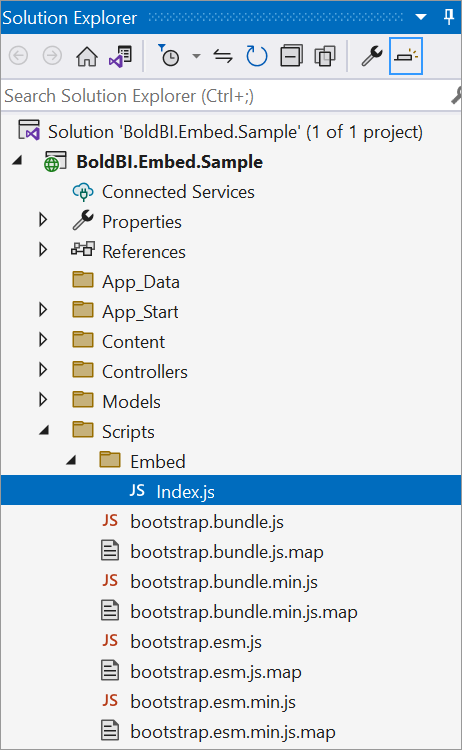
function renderDashboard(dashboardId) {
   var dashboard = BoldBI.create({
      serverUrl: rootUrl + "/" + siteIdentifier, // Dashboard Server BI URL (e.g., http://localhost:5000/bi/site/site1, http://demo.boldbi.com/bi/site/site1)
      dashboardId: dashboardId, // Provide the dashboard ID of the dashboard you want to embed here.
      embedContainerId: "dashboard", // DOM ID where the dashboard will be rendered; here it is "dashboard".
      environment: environment, // If Cloud, you should use BoldBI.Environment.Cloud
      mode: BoldBI.Mode.View, // Rendering mode of the dashboard; it can be either Design or View.
      expirationTime: 100000, // Set the duration for which the token will be valid.
      authorizationServer: {
         url: authorizationServerUrl // URL from which the specific dashboard details are obtained from the server.
      }
   });
   dashboard.loadDashboard();
}
For dashboard listing, additionally include the following scripts in the
Index.jsfile:function Init() { var http = new XMLHttpRequest(); http.open("GET", getDashboardsUrl, true); http.responseType = 'json'; http.setRequestHeader("Content-type", "application/json"); http.onreadystatechange = function () { if (http.readyState == 4 && http.status == 200) { ListDashboards.call(this, typeof http.response == "object" ? http.response : JSON.parse(http.response)); } else if (http.readyState == 4 && http.status == 404) { console.log("Server not found"); } else if (http.readyState == 4) { console.log(http.statusText); } }; http.send(); } function ListDashboards(data) { if (typeof data !== "undefined" && data !== null) { renderDashboard(data[0].Id); data.forEach(function (element) { var divTag = document.createElement("div"); divTag.innerHTML = element.Name; divTag.className = "dashboard-item"; divTag.setAttribute("onclick", "renderDashboard('" + element.Id + "')"); divTag.setAttribute("name", element.Name); divTag.setAttribute("itemid", element.Id); divTag.setAttribute("version", element.Version); divTag.setAttribute("ispublic", element.IsPublic); document.getElementById("panel").appendChild(divTag); }); } } -
Please run your ASP.NET MVC sample in Visual Studio.